Click Stream SAP Portal analytics has just introduced two new handy additions into its deep bag of usage statistics – a New Users report and Country History report.
While just released, our Sweetlets developers have been working closely with a client over the last few months to bring these new features to life. And as a bonus for you, here is a peek inside this client’s portal with some real life results.
Click Stream: Countries History Report from Sweetlets on Vimeo.
Interpretation:
The countries history report displays the same information as the countries report, but animated over time.
In the first part of the video, the granularity of the animation is hourly. So each frame displays the regional distribution of the portal usage for one specific hour. Take note in this client’s portal how the distribution of users changes throughout the day from country to country.
The second part portrays global trends of their portal usage, per week over the current quarter.
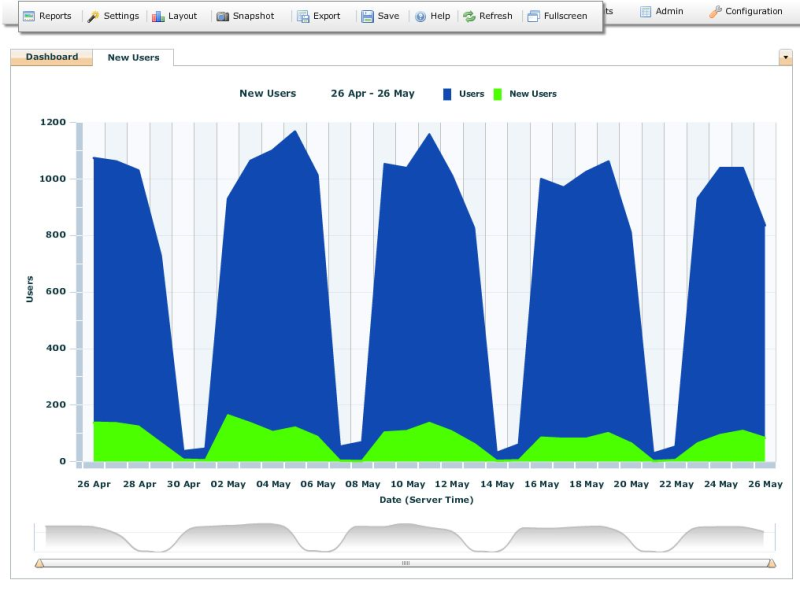
Click Stream New Users report - real life example in a client's portal
Interpretation:
The blue area in this chart displays the total number of portal users per day.
The green area indicates the portion of users that accessed their portal for the first time (since Click Stream started recording their usage)
The very first alternative to the standard SAP Portal Activity Report (PAR) and Activity Data Collector (ADC) for tracking your portal usage.
Comments are closed.

 HTML5 Navigation
 Click Stream
 BW Tree
 Events Calendar
 Pretty Poll
 Quick Links
 SSO Express
 System Messenger
 World Times